Stage 2 Apps server installation
MDI Stage 2 Apps are run by an R Shiny apps server that you access with a web browser.
You can run an apps server from one of several installation locations as described below. All but the public server mode are best installed, managed, and used via the MDI Desktop:
- repository: https://github.com/MiDataInt/mdi-desktop-app
- documentation: https://midataint.github.io/mdi-desktop-app
Installing an apps server entails building R package libraries in your MDI installation, unless both a remote HPC server and your tool suite support Stage 2 Apps Singularity containers that carry the required libraries.
Local mode
In local mode, you run the R Shiny server on your desktop or laptop computer, which acts as both the web server and client (i.e., browser). The advantages of this mode are security and speed, but access to data on a server may require file transfer.
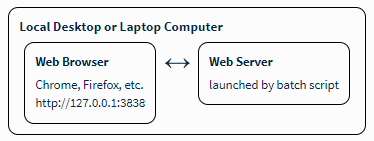
First, you must install R:
- R project via CRAN: https://cran.r-project.org/
Then, follow the MDI Desktop documentation to install and run the apps server on your local computer.
Remote modes
You can also run an apps server on a remote HPC server, or one of its nodes, with a connection over a secure SSH port tunnel. The advantage of this mode is that your apps have ready access to the same disk drives as your pipelines.
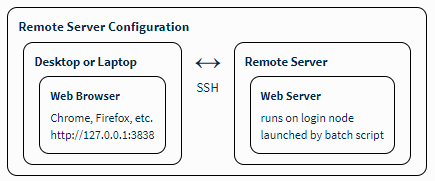
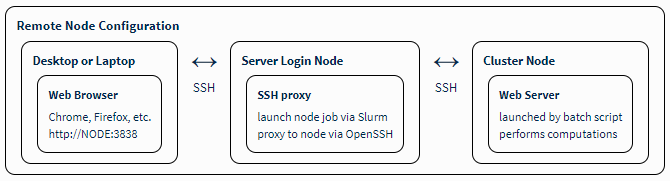
If your tool suite supports containers and the remote server has Singularity available, no futher installation is needed. Just point the MDI Desktop at the correct path on your remote server.
Otherwise, you can pre-install the R package libraries from the command line:
# <mdi_alias_name> install --packages
mdi install --help
mdi install --packages -n-cpu 4
Alternatively, there is a (Re)Install button in the MDI Desktop you can use to complete the apps server installation.
Public server mode
Advanced users can also set up a public Stage 2 Apps server on Amazon Web Services (AWS) using our Amazon Machine Images (AMIs), where the main advantage is stable, shared access between many users.
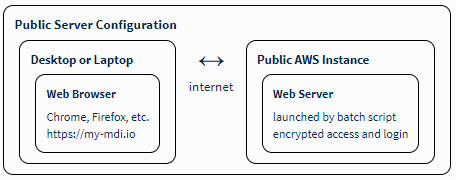
The following links provide instructions and access to the AMIs. Some knowledge of deploying AWS instances, public URLs, and authorization services is required.
- instructions: https://midataint.github.io/mdi-aws-ami/docs/overview
- AWS AMIs: mdi-empty machine images
- AMI repository: https://github.com/MiDataInt/mdi-aws-ami
- web server repository: https://github.com/MiDataInt/mdi-web-server